Saturday, January 23, 2021

39 Technology Gadgets to Improve your Home Office

HOME OFFICE RECOMMENDATIONS FOR LAWYERS LIVING IN A COVID WORLD 

Members of my firm began working from home in mid-March of 2020 - along with just about every other DC area law firm. Almost immediately, our Information Systems Group was inundated with inquiries from our attorneys seeking our professional recommendations for home printers, displays, mice & keyboards, etc. Last year, we compiled all of our favorite / recommended gadgets into one email for all to see. Nearly a year later, we’ve updated that list to ensure the products are still available (and in instances where they weren’t, we provided an alternative). We also added a few new gadgets.

Prices and availability are as of January 2021 and we’ve included the brand and model number of each gadget so you can shop around if prices and availability change.

DISPLAYS

Acer V277 bmipx 27" 16:9 IPS Monitor
$169.99
Fully compatible with Surface Books – what we now purchase for office use.


Samsung TU7000 43" Class HDR 4K UHD Smart LED TV
$339.00
TV that is fully compatible with Surface Books as a second monitor – this is one big 43” high resolution screen that you can fit all of your apps on.


PRINTERS

HP ENVY Photo 7858
$194.99
Basic Color Printer, Copier, Scanner & Fax for light work. For the price, it’s great for what it is. Scan directly to the firm's network AND anyone can print nearly any document from any device from anywhere in the world by simply emailing it to your printer’s own email address.


HP LaserJet Pro M404n
$269.00
Monochrome (Black and White) Printer.


HP Color LaserJet Pro M255dw
$299.00
Color Printer.


HP Color LaserJet Pro M479FDW Multifunction Printer
$599.99
Print, Scan, Copy, Fax (Multifunction Printer).


SURFACE BOOK / LAPTOP ACCOUTREMENTS

Microsoft Surface Dock 2
$169.99
Connect your Ethernet cable, multiple monitors, keyboard, mouse, speakers, and other USB Devices to your Surface Book with this latest and greatest Surface Dock 2


Tripp Lite USB 3.0 SuperSpeed to Gigabit Ethernet NIC Network Adapter White
$17.61
Used to hardwire your Surface Book or Laptop to your router if you don’t have (or need or want) a Dock or don’t have an Ethernet port on your laptop.


UbiGear New 300ft Blue RJ45 CAT6 Ethernet LAN Network Internet Computer Solid Wire 23 AWG UTP Cable
$33.97
The fastest, most reliable, and least expensive way to improve your Internet connectivity is to hardwire your computer to your Internet router. This cable gives you plenty of reach. If your house is so big that your computer is more than 300 feet away from your router, then you can afford to pay someone to come in and wire your house.


StarTech.com 3ft Mini DisplayPort to DVI Active Adapter Cable - mDP to DVI
$22.31
Adapter used to connect Acer Display(s) (above) to your Surface Dock.


UNI USB C to HDMI Cable
$17.99
Adapter used to connect Samsung Display (above) to USB-C Port of Surface Book 2.


Surface Book \ Laptop Stand (EPN Laptop Riser)
$31.99
Elevate your Surface Book / Laptop to the same height as your external display while decluttering your desktop.


KEYBOARDS & MICE

Dell Keyboard (US) KB216 Multimedia
$17.99
Basic Wired Keyboard.


HP USB 3 Button Optical Mouse (KY619AA#ABA)
$10.29
Basic Wired Mouse.


Logitech MK270 Wireless Keyboard and Mouse Combo - Keyboard and Mouse Included
$24.99
Basic wireless keyboard and mouse combination.


Logitech K830 Illuminated Living-Room Keyboard with Built-in Touchpad
$59.99
Illuminated wireless keyboard with touchpad (no mouse required).


Logitech K780 Multi-Device Wireless Keyboard for Computer, Phone and Tablet – Logitech FLOW Cross-Computer Control Compatible
$79.99
Control up to three devices with the same keyboard (e.g., Surface Book, iPad, and iPhone).


Logitech M720 Triathalon Multi-Device Wireless Mouse
$39.99
Control up to three devices with the same mouse (Not for controlling iOS devices).


BLUETOOTH HEADSETS

Plantronics Voyager 5200
$133.55
High quality, 6+ hours talk time with mute, answer by voice, and convenient desktop charger / case.


MPOW M5 Pro Bluetooth Headset
$34.99
Inexpensive but will still dramatically improve your experience.


INEXPENSIVE LAPTOP

Acer Aspire Slimline Laptop
$364.98
Acer Aspire 5 Slim Laptop, 15.6 inches Full HD IPS Display, AMD Ryzen 3 3200U, Vega 3 Graphics, 4GB DDR4, 128GB SSD, Backlit Keyboard, Windows 10 in S Mode, A515-43-R19L, Silver.


MISCELLANEOUS OFFICE EQUIPMENT

CyberPower CP425SLG Standby UPS System, 425VA/255W, 8 Outlets, Compact
$48.95
Uninterruptible Power Supply to keep you running when power issues arise.


Nulaxy A4 Cell Phone \ Tablet Stand
$11.99
Keep your cell phone or tablet elevated and easily viewable without having to pick it up.


BUBM Desk Pad Protector 35.4" x 17"
$16.99
Protect your desk with this ginormous mouse pad.


3-Pack Cable Holder Clips
$8.95
Keep your charging cables accessible and organized.


VELCRO Brand - 1801-OW-PB/B-75 VELCRO BRAND ONE-WRAP TAPE 1/2" X 25 YARD ROLL
$15.84
Nothing screams “OCD” like cable management – and that’s just 1 out of a million uses for this alien technology


AmazonBasics High-Back, Leather Executive, Swivel, Adjustable Office Desk Chair with Casters, Black
$119.99
Your work from home back & butt saver.


HDZWW Video Game Chairs Boss Chair Office Desk Chair High-Back Leather Electric Reclining Executive Swivel Thick Padding and Ergonomic Design with Headrest and Lumbar Support for Home and Office
$8,392.80 (but hey, it comes with FREE Shipping!)
This isn’t merely a “chair” – it’s a Throne


Crystal Clear 1/5" Thick 47" x 35" Heavy Duty Hard Chair Mat, Can be Used on Carpet or Hard Floor
$59.99
Protect your carpet or wood floors from scratches - and this mat will never form dimples or crumble to dust like other floor mats.


MONBLA Desk Supplies Organizer
$12.99
Keep your pens and pencils in their place


PILOT G2 Premium Refillable & Retractable Rolling Ball Gel Pens, Bold Point, Black Ink, 12 Count
$12.88
Smooth writing utensil for when you must use paper.


Pilot Precise V5 Rollerball Pens, Extra Fine Point, Black Ink, 5/Pack
$10.67
Ultra fine pens for cramming more words onto a page.


Sticky Notes 8x6, 6 Color Bright Colorful Sticky Pad, 6 Pads/Pack, 45 Sheets/Pad, Self-Sticky Note Pads
$13.99
The only paper in my home office - great for jotting down meeting notes and doodling funny pictures of Zoom faces.


Digital Indoor TV Antenna
$19.99
No cable box in your home office? No problem. Get local HD channels for free with this digital antenna. 90-120 Mile Range.


COOL TOOLS FOR ZOOM AND TEAMS MEETINGS

1080P Webcam with Microphone - C960
$30.99
Plug and Play USB Webcam for Online Calling/Conferencing, Zoom/Skype/Facetime/YouTube, Laptop/Desktop


HumanCentric Video Conference Light
$54.99
Adjustable video conference lighting for your Surface Book or Display


Yeti Rambler 10 Oz Lowball
$19.99 (without customization)
Keep your coffee hot for hours in this “spill-proof” low center of gravity caffeine and cocktail cup


ArtCreativity Pump Action Foam Ball Launcher
$13.97
Keep critters and kids at bay during those lengthy Zoom and Teams meetings.


Honbay 3D Funny Eyeshade Soft Sleep Eye Mask with Adjustable Head Strap
$7.49
Catch up on sleep during those lengthy Zoom meetings - without anyone knowing. Mute your microphone to ensure no one hears you snoring.


Friday, January 12, 2007

Fixing the Windows Vista Print Spool Problem


Been running Windows Vista Ultimate RC1 and having a good time of it ... until last night. I tried to print about 60 JPGs to PDF and the system came to a screeching halt. Then all my printers disappeared. Whenever I tried to add a new printer, Vista would give me an error that blared "PRINT SPOOLER SERVICE NOT RUNNING" and "WINDOWS CAN'T ADD OPEN ADD PRINTER". Arrrgh. Whenever I'd go start the print spooler service manually, it would crash as soon as I tried to add a printer.

I also noticed that my 60 GB SATA primary drive lost about 10 GB in the process.

Here's how to fix it...Go to C:\Windows\System32\Spool\Printers and delete the files contained therein. In my case, I had a file that was about 10GBs. (If you wanna be safe, send them to the recycle bin rather than permanently deleting them.)

Then RIGHT CLICK on MY COMPUTER, select MANAGE, then SERVICES AND APPLICATIONS, then SERVICES, then RIGHT CLICK on PRINT SPOOLER and select start. You should see all of your printers again.

Overall, Vista is one bitchin OS and I can't wait to roll it out to my new firm. Happy Friday.

Sunday, January 07, 2007

OpenPoint Issue Tracker: Help for Small and Mid-Sized Firms' Help Desks

Small to mid-sized law firms rarely have the manpower and resources required to dedicate towards a full time, fully staffed, formal Help Desk. There are always more pressing issues to be addressed and more pressing matters requiring funding. Because the IT Departments are on the smaller side, communication and coordination are typically non-complex and identifying trends and emerging problems tend to be more anecdotal than documented. That's a shame, because the management of smaller firms tend to be more tight fisted when it comes to doling out the dollars on IT initiatives - and clear documentation of what the IT Department is accomplishing can go a long way towards opening wallets. More than once, I've seen small IT Departments run so efficiently that firm management assumes the systems run themselves - and actually cuts back funding or rejects desperately required initiatives.

OpenPoint Issue Tracker by FaxOne Systems LLC allows you to reverse that trend by tracking your performance and advertising your productivity up the chain. Issue Tracker loads as a web server on virtually any workstation or network server and allows members of you IT team to open and track tickets from any web browser at any workstation - including at a user's computer if you're snagged on your way back in the door from lunch. OpenPoint Issue Tracker allows you to create projects, subprojects and categories which can range from the simple Hardware / Software down to whatever level of minutiae you are comfortable with. The search function allows you to quickly determine whether similar issues have been addressed and resolved (and what the solution is if it was previously documented). The reporting functionality allows managers to determine who's doing what, where and when. Better yet, Issue Tracker makes it easier to identify emerging problems and nip them in the bud before they become insurmountable dilemmas.

The reporting functionality also allows you to demonstrate to management the need for additional staffing, funding, training, upgrades, or major initiatives. When it's in black and white, on paper, and in their hands, it becomes "real" to lawyers and management is hard pressed to ignore the recommendations presented by the IT Manager.

Best of all, OpenPoint Issue Tracker is free and can be downloaded HERE. A plethora of screenshots appear on FaxOne's web site.

Saturday, January 06, 2007

SyncBack SE: Monstrous Backups at a Miniscule Price

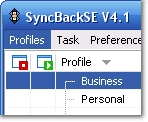
SyncBack SE by 2BrightSparks is a superb piece of software for backing up anything and everything on your workstation or network drives. Copy open files, do incremental backups, synchronize directories, perform encrypted backups to external IP addresses or FTP sites, and much, much more. At the pathetically low price of $25, you can forego the use of their fully functional 30 day trial - but it's available HERE if you want it.

With SyncBack SE, you create "Profiles" - akin to scheduled tasks in Windows - which allow you to discreetly define how, when, where and what is being backed up or synchronized. For years I've been a huge fan of Microsoft's Robust File Copy Utility (a.k.a. "RoboCopy) because it allows me to create batch files that I drop into the login script, or just stash on the network for whenever I need them. That comes in handy when you need to make sure someone's not stashing .pst files on their local hard drives, or when you are migrating a user to another workstation and want to quickly copy their favorites, cookies, desktop, etc. RoboCopy will remain in my arsenal. XXCopy too, provides some great features not easily found in other products. For example, XXCopy allows me to create flat directories - scouring a drive and copying all .jpg files to one directory, adding the directory and subdirectory path of their original location to the lefthand side of the filename in the destination. That trick allows me to overcome the problem of identically named files overwriting each other - and tells me exactly where the file came from. BUT SynchBack's another animal altogether. SyncBack gives me huge control that even some of the big daddies of backup are hard pressed to replicate.

Wednesday, December 27, 2006

Law-Firm-in-a-Box (or "How to Tame the Paper Monster")


Last millennium, we tamed the paper monster - jammed a bridle between its gnarly jaws and rode him into submission like a rented pony.

We installed PerfectLaw - an "All-In-One" solution that encompasses everything from Time & Billing to General Ledger to Accounts Payable / Receivable to Docketing to Contact Management to Conflict Checks to Document Management and beyond. I like to think of PerfectLaw as "Law Firm in a Box". And rightfully so.

What differentiates PerfectLaw from any other solution out there is that it does everything (and does it well). You enter client / matter information once and it is available across all libraries. Whether you are profiling a document, entering time, submitting an expense, scanning a document or generating a management report, the user interface is easy to learn and consistent throughout the suite.

And PerfectLaw is notable for what it doesn't do: because all of the varying components share a single SQL database, there are no synchronization problems. No delay problems. No corruption problems. No room for vendors to play the finger pointing game and blame another vendor when compatibility issues arise. It all just simply works. And works well.

Before you go out and spend hundreds of thousands of dollars on Elite, ProLaw, Interwoven, Hummingbird, Time-Slips or any other legal software - take a good long look at PerfectLaw. They make everyone else look like rank amateurs.

Camtasia Studio: Cool Tool for Training Videos

The lowest common denominator for every IT Manager is to keep the network up and humming along. Once that fundamental mission is accomplished - only then can you tip toe into the technological trifecta that distinguishes you from a mere techie: identifying, implementing and advertising solutions that allow your attorneys to more effectively represent their clients. Once initial training for a rollout is completed, the "advertising" component is too often relegated to a screenshot ladened memo or email entitled, "How To ..." That approach does a disservice to the time and effort you expended in indentifying and implementing the solution in the first place. Camtasia Studio places the advertising component on the front burner where it belongs, by allowing you quickly, easily and inexpensively create universally accessible training videos for your employees.

Camtasia Studio captures everything on your screen - from mouse movements to typing - and records your voice in the process. We use Camtasia to create short 3-5 minute training videos and make them available on the firm's Intranet. There are always questions that are hitting the help desk - and when the same questions arise repeatedly - they are prime candidates for Camstudio. Whether the question is about creating a table of authorities, changing styles in Word, running Easy Bates, tethering a Blackberry for use as a modem, whatever ... Camtasia allows you to create a video of the steps and save the resulting file in WMV, AVI, Flash, Quicktime, RealMedia, EXE, MP3 and even iPod format. Save the file to a network share, drop a link on the Intranet and you've brought advertising to a whole new level.

Camtasia Studio is available for $299 for an individual license - or $1,195 for a 5 pack. A fully functional 30 day trial version is available HERE. When you're spending hundreds of thousands of dollars on major rollouts, another couple hundred dollars is a small price to pay for ensuring the solutions you've efectively implemented are being effectively used.

The Bungled Jungle: The Perfect Gift for Computer Geeks


Every once in a blue moon, you come across something so uniquely ridiculous, you just can't get it out of your mind.

Perusing through an art festival, I recently stumbled upon a traveling display hosted by "The Bungled Jungle" - an art gallery based out of Salida, Colorado. The Bungled Jungle is best described as the marriage of "Where the Wild Things Are" to artists with too much time and creativity on their hands.

One particular display that left me chuckling was a gutted out shell of a computer monitor containing a handful of "Computer Viruses" - each virus meandering around inside the display's lighted shell. Viruses of differing shapes, sizes and colors - each clutching a piece of RAM or fragment of motherboard.

Wednesday, August 09, 2006

Perils and Pitfalls of Merger Negotiations

A decade and a half ago, I stood in the crowded main conference room of Maryland third largest law firm. Earlier that Monday morning, driving into work, NPR blared on my radio the news that the partners of the firm had convened an unheard of Sunday shareholders' meeting - and voted to dissolve the 140 year old firm.

In cemeteries throughout Maryland, the skeletal remains of attorneys long gone rolled over in their graves.

It would take days before I realized how much orchestration, how much conniving, how many smoky back room deals must have been cut over the preceding months, and how much backstabbing must have occurred in order for that vote to have even taken place. And to have the news broadcast throughout the greater metropolitan DC area less than 12 hours after the vote - with only a Sunday night intervening? Well, that just defines the breadth and depth of the planning.

Standing in that conference room, the office's managing partner assured us that - as an office - we had merge into the firm just two years earlier as a whole - and we would simply merge ourselves into another firm as a whole. No one left behind. Take us as a whole or not at all. Noble words - but demonstrative of the dangerously naive business sense most attorneys carry with them.

The core group of rainmakers began negotiating with other mega-firms in the area. Their noble words turned to empty deeds when the negotiating committee cut a deal for themselves only - leaving everyone else in the lurch. It all comes down to self preservation - and when forced to make a decision at the negotiating table between saving themselves or holding out more a more inclusive deal, the rainmakers justify their survival-of-the-fittest Darwinian decision by convincing themselves that they have already taken care of their employees by providing years of prior work - and that it's simply time for them to leave the nest and fly away.

I was one of 5 who helped dissolve and liquidate the firm - and 'twas not a pretty sight. A lot of butt-hurt people whose years of loyalty to the rainmakers bought them nothing but COBRA rights.

Now, it's deja vu all over again. My existing firm is in merger negotiations - and even before it begins in earnest, the Darwinian mentality is seeping through - despite the reminiscent speech to the masses that we will only merge if we can bring the whole firm along.

Riiiiggggghhhhht.

Tuesday, August 01, 2006

Security - and How One Young Marine Brought a Battalion to Its Knees

The Marine Corps tests the readiness of its infantry units before they are are permitted to deploy around the globe. Typically, the test measures the unit's ability to locate, close with and destroy a smaller, counter-insurgency sized force. The ratio is somewhere in the neighborhood of 50 aggressors against a battalion of 1500 Marines. The aggressors are selected from a separate unit - which takes pride in inflicting mock casualties on the unit being tested.

On the one occasion I was selected to be an aggressor, we actually came to "blows" in combat town - a good old fashioned bared knuckled brawl in the middle of a combat town. During the same exercise, I hit a tank turret with an M-203 grenade (spewing dayglow orange dye instead of white phosphorous). The tank commander whipped his M-1 Abrams straight towards us - plowing down saplings to reach us - and, but for the speed of our Humvee - I'm certain we would have come to blows with them as well. The point is - both sides took their roles VERY seriously.

There is a Marine Corps legend of a young PFC (Private First Class) who was selected to be a member of the aggressing unit. On his own initiative, the young PFC spent the weekend prior to the exercise rummaging through the battalion's dipsy dumpster. As a member of the aggressing unit, he was able to walk away with map overlays, memos, radio frequencies, call signs, every aspect of the battalion's battle plan for the upcoming test. When the exercise began - it was a slaughter. The command and control of the battalion was neutralized almost immediately. The counter insurgency unit used the radios, frequencies and call signs to wreak utter havoc on what remained of the battalion - having one company launch mock mortars against another company in the same battalion. Masterful.

It was possible because one young, ambitious Marine recognized that one man's trash is another man's treasure. He walked away with another stripe on his sleeve.

How far do you think an unscrupulous attorney might go to win millions for his client? How safe is your trash? How safe is your network? How loyal are your employees?

Don't think espionage happens in law firms? One day, a battalion of Marines never thought they could be brought to their knees by a young PFC and his trash bag.